
How to Redeem Arcane 101 Codes: Group, Tutorial, Code Box
Step-by-step Arcane 101 code redemption: join the Lucky's Pals group, finish the tutorial, open the main menu and enter the code. Includes why a code fails.
FAQ
How do I redeem codes in Arcane 101?
Which key opens the Arcane 101 menu?
Why does my Arcane 101 code say invalid?
Do I have to join the Roblox group?
What do codes give?
How do you redeem a code in Arcane 101?
Join the Lucky’s Pals Roblox group, finish the tutorial, open the main menu, type the code into the Enter a code box and press Redeem. The group requirement is first-party. The rest comes from code guides that agree with each other, and we have not replayed the steps ourselves. Current codes and their status are on the codes ledger.
Checked against the sources on 2026-11-15.
Step 1: Have you joined the Lucky’s Pals group?
Verified The Roblox Lucky’s Pals group says: “Codes are for members only! Join this group to claim them!” Join with the same Roblox account you play on. The group had 14,378 members on 2026-11-15.
Step 2: Have you finished the tutorial?
Reported At least three independent code guides (games.gg, ProGameGuides and Destructoid) say redemption does not work until the tutorial is done. We have not tested this, but it is the first thing to check when a code fails on a new account. The beginner guide covers the first hour.
Step 3: How do you open the main menu?
Disputed · M vs K Guides disagree on the shortcut. MrGuider, games.gg and ProGameGuides say the M key. Destructoid says the K key. We do not know which is current, so try both, and use the in-game menu button if neither works.
Step 4: Where is the code box, and what do you type?
Reported One guide describes a text box labelled Enter a code in the main menu, below Update Logs, with a Redeem button. We could not confirm the layout from a second source, so treat the position as a hint. Type the code exactly as it appears in the ledger, using capital letters, with no spaces before or after.
Why does a code fail?
- It is expired. Older codes such as SORRY4RESTARTS and TYSM100LIKES are reported expired.
- It is disputed. THX4LIKES and STOPRELEASINGBUGSPLS are called expired by the newest pages and still active by older ones. Expect some of these to fail.
- It was mistyped. Letters and digits look alike (the code 1000LIKESWOWIE starts with a digit one).
- You have not joined the group or finished the tutorial. See steps 1 and 2.
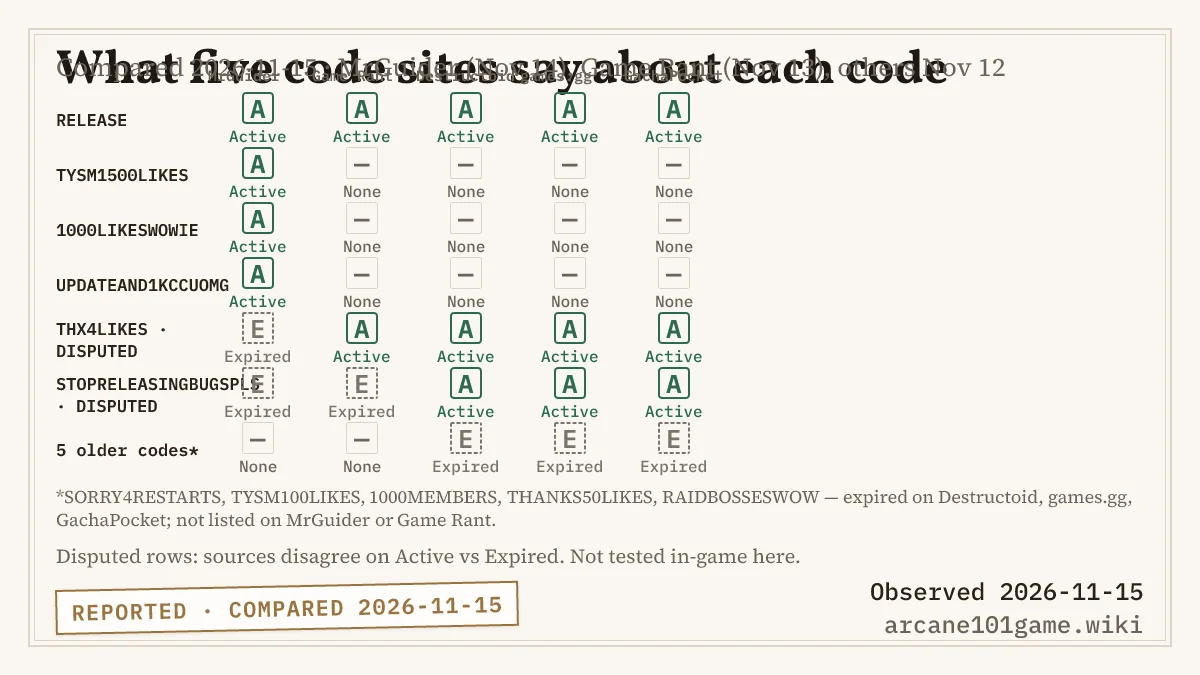
Which source calls which code active or expired, compared on 2026-11-15. Disputed rows are the ones the sources contradict each other on.
What do the codes give?
Reported The codes listed by third-party sites give Race Rerolls, and UPDATEAND1KCCUOMG also lists 100 Gems. If the four codes reported active all work, that is 80 Race Rerolls in total. What a Race Reroll does is covered in Races and Rerolls.
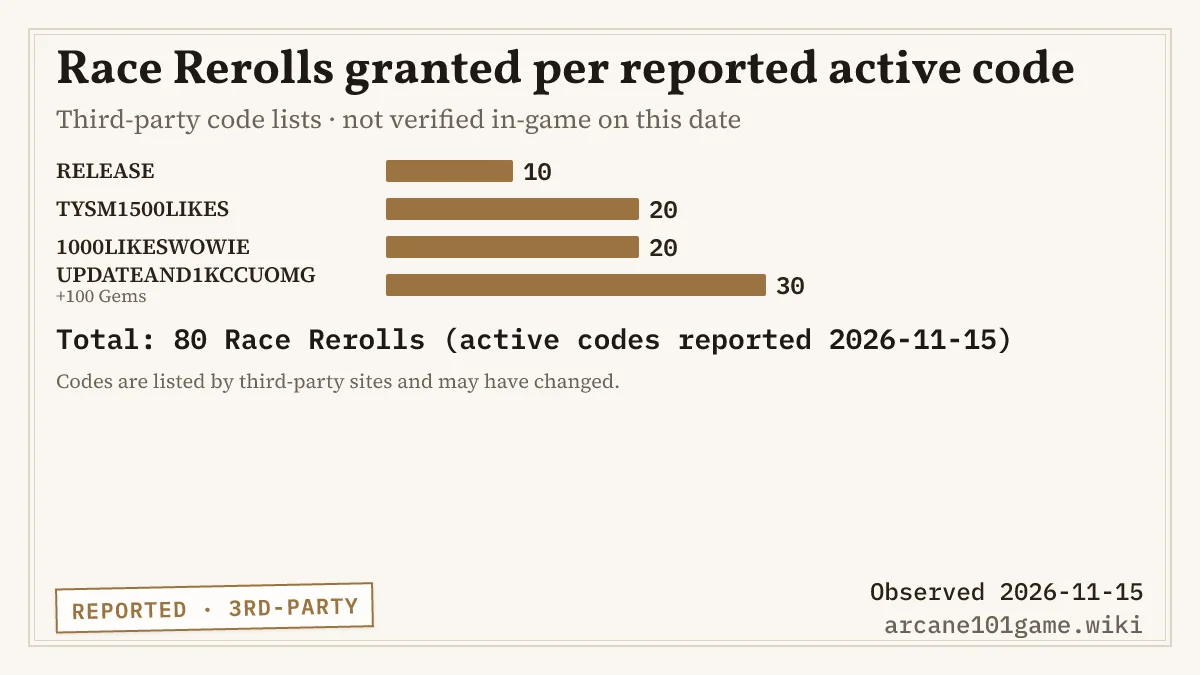
Race Rerolls per reported-active code, as listed by third-party sources on 2026-11-15.
For how we decide between “active”, “disputed” and “expired”, see how we label evidence.
Related Articles
bosses
Arcane 101 Bosses: Three Named, Eight Still Unnamed
Which Arcane 101 bosses are named in official text, which are only implied by badges, and why this wiki does not publish boss strategies yet.
bosses
Arcane 101 Areas and Progression: 8 Lands, 11 Bosses
How many lands and bosses Arcane 101 has, what the nine area-clear badges mean, and how far players progress by award counts on 2026-11-15.
codes
Arcane 101 Codes (Nov 2026): Reported, Disputed, Expired
Every Arcane 101 code we know of with its reward, the sources that list it and the date we compared them. Two codes are disputed between sources.
Was this helpful?
Thanks for the feedback!